
Who it is for
- Training and compliance administrators
- Managers responsible for renewal follow-up
- Teams replacing calendar and spreadsheet reminders
Solution
Turn renewal dates, missing evidence and overdue training into visible follow-up work before managers are left chasing manually.
14-day trial. No card. Use test data first.
This workflow is included from Growth. Advanced controls vary by plan. Compare plans.
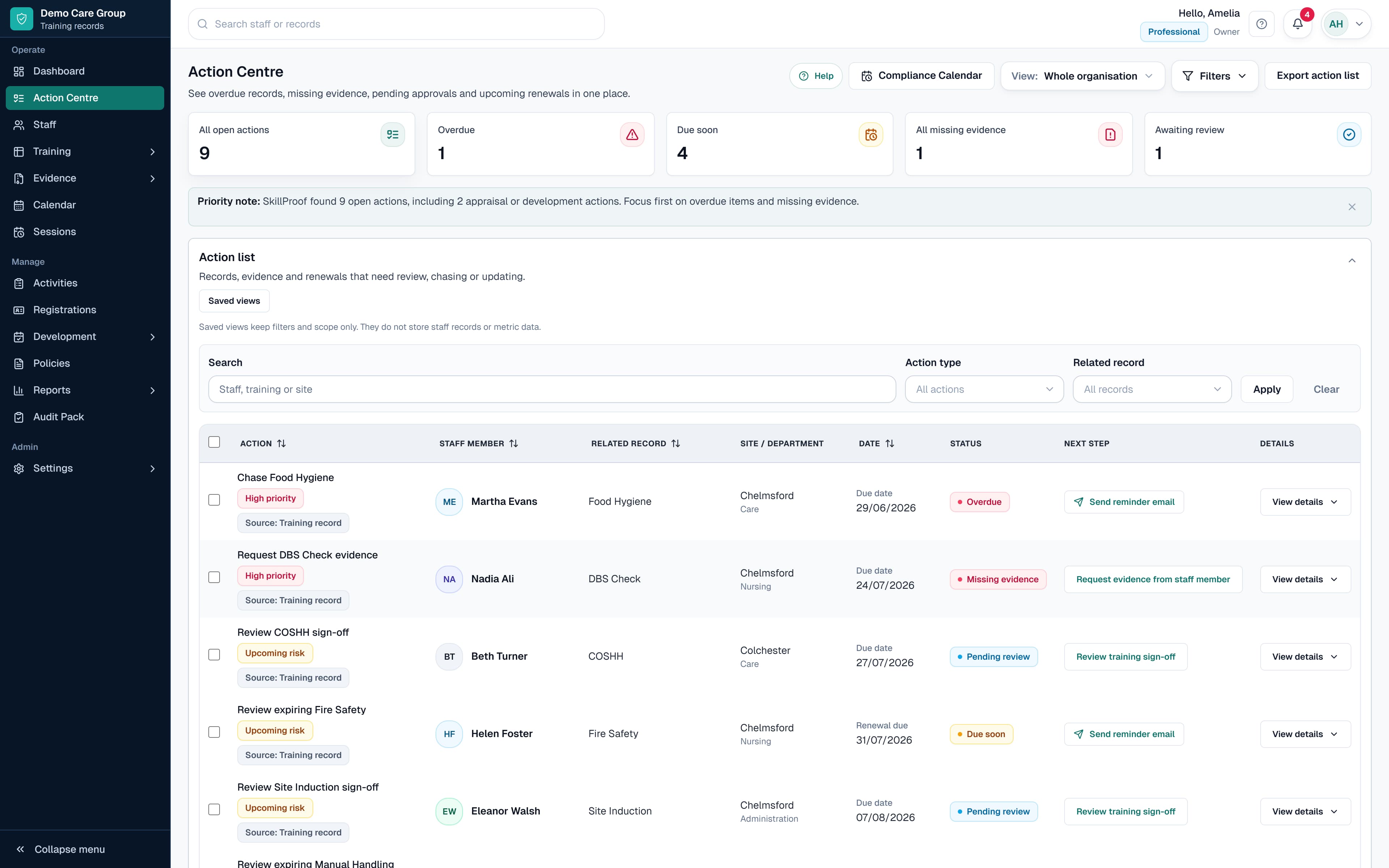
Real SkillProof product workflow shown with safe demo data.
Renewals and reminders
Training renewal tracking software records each renewal date and turns due-soon, overdue or missing-evidence records into visible follow-up. SkillProof can also send automated reminders on eligible plans when reminder automation is enabled. Your organisation sets the renewal rules and remains responsible for acting on the alerts.
Plain-English answer
SkillProof turns training renewal dates, expiry risks and missing evidence into due-soon, overdue and follow-up actions for the right people.
Renewal dates and evidence gaps become a shared action list instead of relying on one person to filter a spreadsheet and send messages by hand.
An LMS may remind learners about its own courses. SkillProof follows renewal dates and evidence across the training providers and records your organisation already uses.
Choose the right workflow
The same workflow, with the live record and the next action kept in front of the team.
Before SkillProof
With SkillProof
Renewals and reminders
See due-soon and overdue items in the Action Centre, send reminders and keep the follow-up visible against the record.
Set training items, renewal periods and training by role.
Record completions, expiry dates and evidence status.
Review due-soon, overdue, missing evidence and awaiting sign-off actions.
Use reminders and manager actions to prompt the right people.
A real SkillProof product view shown with safe demo data. The exact records and controls available depend on the workflow and plan.
Training reminders often rely on spreadsheet filters, calendar notes and inbox chasing, which makes follow-up inconsistent as teams grow.
See renewals before they become overdue.
Keep certificate and proof gaps visible beside the related record.
Show managers the staff and records they are responsible for following up.
Keep a clearer record of reminder activity on plans that include it.
Straight answers about the record, workflow and product boundary.
Training renewal tracking software records when training needs to be renewed and shows which records are due soon or overdue. It can also connect the renewal date to the staff record, supporting evidence and follow-up history.
SkillProof can surface due-soon and overdue records, and plans with automated reminder workflows can help reduce repeated manual chasing.
Yes. Missing evidence can appear as a follow-up action so managers can request or review proof against the related training record.
No. Reminders help organise follow-up work, but each organisation remains responsible for deciding what evidence, training and action is required.
Open the next product workflow or guide when you need more detail.
Next step
Start with test data or book a walkthrough to see how the record, evidence and follow-up work together.
No card required. 14-day trial. Start with test data first.