
For HR, training and compliance consultancies
Manage client training and compliance records in one portfolio
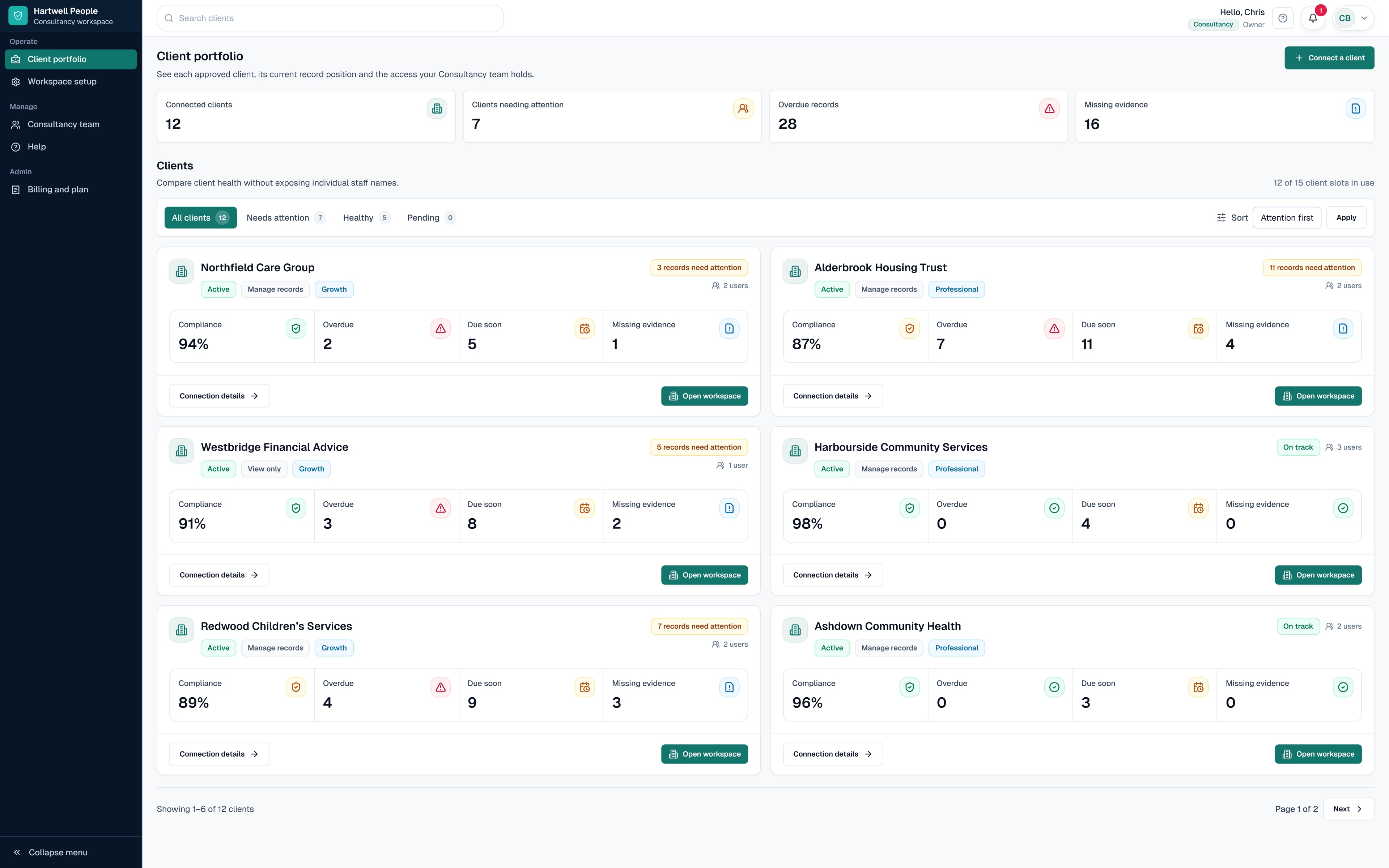
See overdue records, missing evidence and upcoming renewals across your portfolio. Open only client workspaces that have granted access to your named Consultancy users.
No shared passwords. No need to become the client owner.
14 days free. No card required. Then £99 per month or £990 per year if you continue.
Who it is for
Built for ongoing training and compliance work across clients
For HR, training, health and safety, and compliance consultancies that manage workforce records across several client organisations.
SkillProof Consultancy is not a way to take ownership of a client account or access client records without approval.
One portfolio across clients
Review the position across connected client organisations without maintaining a separate consultancy spreadsheet or sharing client passwords.
Prioritise what needs attention
See overdue records, missing evidence and upcoming renewals, then open the approved client workspace where action is needed.
Keep every client independent
Each client retains control of its own workspace, subscription, records and internal users. Consultancy access and services remain separate.
How access works
Clear boundaries from the first client
Client-owned workspace
Each client retains ownership of its workspace, subscription, training and compliance records, and internal users.
Named-user access
The client approves the named consultancy users and chooses the access level each person receives.
Immediate revocation
A client owner can narrow or remove consultancy access without asking the consultant to surrender a password.
Four-step approval
How a client connection works
Step 1
Request a connection
The consultancy requests access to a client organisation.
Step 2
The client reviews the request
The client decides whether to connect its workspace.
Step 3
The client chooses the users and access
The client approves the named Consultancy users and the access level each person receives.
Step 4
Approved users can open the workspace
Each approved consultant can work only within the access granted by that client.
Portfolio overview
See training and compliance work that needs attention without opening every client
Portfolio indicators provide an overview across connected clients. Individual staff records remain inside the relevant client workspace.
Overdue records
Missing evidence
Records due for renewal
Client plan
Connection status
Granted access level
Consultancy pricing
Who pays for what
The Consultancy pays
For the multi-client portfolio, Consultancy users and switching between approved client workspaces.
Each client pays
For its own SkillProof workspace, chosen plan, training and compliance records, evidence and internal staff access. The client remains the account owner.
SkillProof Consultancy
£99 /month
or £990 billed annually after the 14-day trial
- Three Consultancy users
- Portfolio dashboard across approved clients
- Fast switching between approved clients
- Client-controlled access
Permissions
Client-approved access controls
View-only access
Review training and compliance records and supporting evidence without changing them.
Records management
Add or update permitted training and compliance records and evidence within the scope approved by the client.
Consultancy users cannot become the client owner, change the client’s subscription or billing, or approve their own access.
For client owners
Every client stays in control
The client owns its workspace, subscription and data.
The client approves each named Consultancy user.
The client chooses the access granted.
The client can narrow or remove access.
No passwords need to be shared.
The client keeps its workspace if the consultancy relationship ends.
Separate partnership scheme
Interested in referring organisations instead?
SkillProof Consultancy
Manage approved training and compliance work across connected client organisations.
£99 per month or £990 per year
Stay on this pageReferral Partner
Introduce qualifying new organisations to SkillProof and earn 20% recurring commission when an accepted referral becomes an eligible paying customer.
No fee to join the referral route
View Partner ProgrammeImplementation Partner
For separately approved partners supporting larger rollout or implementation work. Commission may be up to 30% where commercially agreed.
Commercial approval required
Discuss an Implementation PartnershipA business may use SkillProof Consultancy alongside an approved Partner Programme route, but these are separate products and agreements.
Connecting to or managing an existing client does not itself qualify as a referral.
The client pays SkillProof's normal published price, and SkillProof pays eligible referral commission.
FAQ
Consultancy FAQ
See the answers specific to consultancy access, billing and referrals.
Does every connected client need its own SkillProof subscription?
Yes. Every client owns and subscribes to its own SkillProof workspace and chooses the plan suitable for its organisation. The Consultancy subscription pays for the separate multi-client portfolio and does not include client subscriptions.
Why do both the consultancy and the client pay?
The client pays for its own workspace, training and compliance records, evidence, users and plan. The consultancy pays for the portfolio tools it uses to oversee approved work across several clients. These are separate products, and the client remains in control of its workspace and data.
Can an existing SkillProof customer connect to a consultancy?
Yes. An existing customer can approve a connection and grant access to named consultancy users without transferring ownership of its workspace.
Can a Consultancy customer earn 20% referral commission?
Yes, where the consultancy registered and introduced a qualifying new customer under the separate Partner Agreement. The client pays SkillProof's normal price, and SkillProof pays the commission.
Does connecting to a client automatically create referral commission?
No. Access and referral attribution are separate. Connecting to or managing an existing client does not itself qualify as a referral.
Who controls the client’s records?
The client retains control of its SkillProof workspace, subscription and records. Consultancy access is delegated by the client.
Can a client remove consultancy access?
Yes. A client can narrow or remove the access granted to its Consultancy users.
What happens if the Consultancy subscription ends?
The consultancy loses access to its portfolio and connected client workspaces. Each client keeps its own SkillProof workspace, subscription and records.
What happens if a client changes consultancy?
The client can remove the previous consultancy’s access and approve access for a new consultancy without transferring ownership of its workspace.
Does SkillProof guarantee legal compliance?
No. SkillProof helps organisations manage training and compliance records, evidence, dates and configured requirements, but does not determine which legal or regulatory requirements apply.
Ready to manage client training and compliance records without shared logins?
Create a Consultancy workspace and connect client organisations that approve your access.
Every client keeps ownership of its workspace, subscription and records.
14 days free. No card required.
Client records remain hidden until the client approves access for your named Consultancy users.